The Corporate IT Refresh Program: A Guide for Growing Businesses
Why a Corporate Refresh Program Matters as You Grow
A corporate refresh program is the planned schedule a business follows to replace aging laptops, desktops, and mobile devices before they become a liability. Instead of waiting for a device to fail or fall behind on security patches, growing businesses use a refresh plan to stay ahead of performance issues, compliance needs, and rising maintenance costs.
Growth puts pressure on IT infrastructure that most organizations don't anticipate. New hires need equipment on day one, distributed teams need reliable collaboration tools, and existing hardware ages faster than budgets adjust for it. Industry research from IDC found that most businesses were actively planning to refresh their PC fleets, a sign of how central a structured refresh cycle has become to normal IT operations rather than an occasional project. Without a refresh strategy, IT teams end up reacting to breakdowns instead of managing the asset lifecycle on their own terms.
It helps to be clear about what a refresh actually has to accomplish. Every refresh works toward three goals: getting new equipment up and running for the team, disposing of the old equipment securely and compliantly, and, wherever the hardware still holds market value, recovering that value instead of leaving it on the table. The first two are non-negotiable. The third is where a refresh program quietly pays for part of itself, and it is the piece most plans overlook. A retired laptop, desktop, or workstation that still has resale demand is an asset, not just a disposal cost, and a proper retirement process is built to capture that residual value rather than shred it.
Understanding the Hardware Refresh Cycle
A hardware refresh cycle is the interval at which a business retires and replaces its computers, laptops, and mobile devices. Most organizations operate on a three to five year refresh cycle for standard devices, though the right timeline depends on device type, usage intensity, and how much risk the business is willing to carry on outdated equipment. Developers, engineers, and employees running demanding applications typically need shorter cycles, while general office hardware can often stretch closer to the five year mark.
The purpose of a refresh cycle isn't simply age. It's about matching device performance to what the business actually needs. A laptop that still boots and runs email may still be creating security vulnerabilities if it can no longer receive firmware or operating system updates. A refresh cycle built around real usage data, not just a calendar date, gives IT managers a defensible basis for budget requests and keeps system performance predictable across the fleet.
Building Your Device Refresh Strategy
A refresh program only works if it's built on a clear process, not a reaction to the next device that stops working. The steps below outline how most growing businesses, including enterprise IT teams, structure a refresh strategy that holds up over multiple budget cycles.
Assessing Your Current IT Infrastructure
Before setting a refresh plan, IT teams need a full picture of what they're managing. That means inventorying every device by age, condition, warranty coverage, and current performance, then flagging which units are approaching end of life. Real time tracking tools make this easier, but even a basic spreadsheet audit reveals which devices are quietly driving up support tickets and slowing employees down.
Setting a Refresh Cycle Timeline
Once the audit is complete, assign a refresh cycle to each device category rather than treating the fleet as one block. Standard laptops, specialized workstations, and shared devices each carry different usage patterns and warranty windows, so a single blanket cycle rarely fits every category well.
Aligning Refreshes with Business Growth
A refresh plan should track projected headcount, office expansions, and new hire onboarding volume, not just current inventory. Businesses that align refreshes with business growth avoid the scramble of emergency purchases when a new team or new hire arrives faster than the hardware budget anticipated.
Key Benefits of a Structured Refresh Program
The case for a formal refresh program comes down to a handful of measurable outcomes that compound over time. A proactive approach costs more to plan upfront, but it consistently costs less than reacting to failures after they happen, and a quick estimate from our pricing tool can help put real numbers behind the comparison.
- Stronger data security: Current devices support the latest security patches, reducing the security risks tied to unsupported operating systems.
- Reduced downtime: Replacing hardware before failure minimizes downtime and keeps distributed teams productive.
- Better employee experience: Reliable, modern devices support employee morale and employee satisfaction, particularly during employee onboarding.
- Predictable costs: Scheduled refreshes reduce maintenance costs and cut down on costly emergency purchases.
- Warranty protection: Replacing equipment while it's still under warranty coverage avoids paying full price for repairs on old hardware.
Data Security and Secure Data Migration During a Refresh
Protecting sensitive data through a hardware transition is one of the most overlooked parts of a refresh program. Every device that leaves the fleet, whether it's being resold, recycled, or retired, needs a documented secure data migration and data sanitization process before it leaves your control. Skipping this step turns a routine refresh into a genuine compliance exposure.
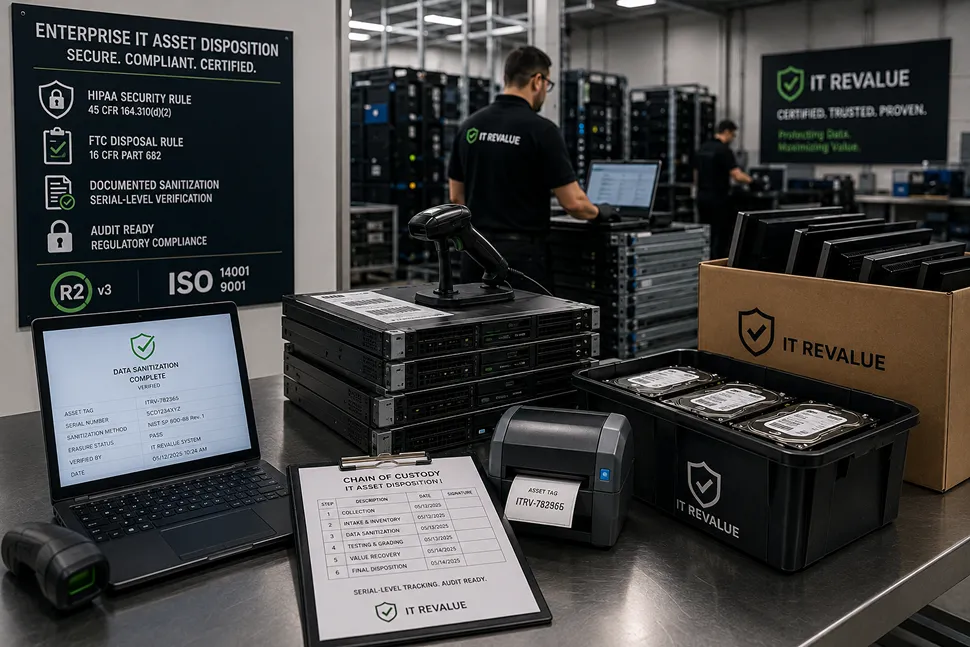
A well-run refresh keeps sensitive information contained through every stage: data is migrated to the new device first, then the retired unit goes through certified data sanitization before disposition. IT Revalue is the dedicated IT asset disposition and equipment buyback brand of PN California, and PN California's facilities hold R2v3 and RIOS certifications, giving IT managers a documented chain of custody for every device that leaves their environment.
Pro Tip: Build data sanitization into the refresh timeline itself, not as a step you schedule after devices are already sitting in a closet. Equipment that lingers ungoverned between "retired" and "wiped" is where data security incidents happen.
Comparing Refresh Approaches: Reactive vs. Proactive
Most IT teams fall into one of two patterns when it comes to hardware: reacting to failures as they happen, or following a proactive, scheduled refresh strategy. The table below breaks down how the two approaches typically compare across the factors that matter most to IT managers and the businesses they support.
| Factor | Reactive Approach | Proactive Refresh Program |
|---|---|---|
| Downtime | Frequent, unplanned | Minimized through scheduled replacement |
| Budget Impact | Emergency purchases, uneven spend | Predictable, spread across budget cycles |
| Security Risk | Higher, due to outdated hardware | Lower, current devices and patches |
| Compliance Needs | Difficult to document consistently | Built into the refresh process |
| IT Team Time | Consumed by troubleshooting old hardware | Freed up for higher-value work |
Businesses running a reactive model often don't see the full cost until they add it up: support tickets, lost productivity from performance issues, and the premium price of last-minute purchases. A proactive refresh strategy converts those scattered costs into a single, plannable line item.
What to Consider When Rolling Out a Refresh Program
Rolling out a corporate refresh program touches budget, people, and compliance at the same time, which is why most rollouts benefit from breaking the plan into distinct workstreams before execution begins.
Budget Constraints and Total Cost of Ownership
Look at the full cost of keeping a device, not just the purchase price of a replacement. Total cost of ownership includes maintenance costs, warranty coverage, energy consumption, and the productivity lost to an aging machine. But a complete TCO picture also works in the other direction: it should account for the residual value of the equipment you are retiring. Laptops, desktops, and higher-spec machines that still have secondary-market demand can be tested, remarketed, and turned back into cash through equipment buyback, offsetting a meaningful share of the replacement spend. Framing the refresh conversation around net total cost, sticker price minus recovered value, rather than sticker price alone, makes it far easier to justify the investment to budget holders. A well-run retirement process is what maximizes that recovered value; equipment that sits ungoverned or gets shredded by default gives it away.
Employee Onboarding and Distributed Teams
A refresh program should ensure employees, wherever they're located, receive equipment that's ready to work on day one. For distributed teams, that means building shipping and setup time into the refresh plan so a new hire in a remote office isn't waiting weeks for a working laptop.
Compliance and Data Sanitization Needs
Industries with strict compliance needs, such as healthcare, finance, and education, should treat data sanitization as a non-negotiable part of every refresh, not an optional add-on. Documented sanitization records protect the business if a retired device is ever questioned during an audit. Our FAQ covers how those records are generated and stored.
Quick Reference: Match Your Goals to the Right Refresh Approach
Use this guide to pair common refresh goals with the practical steps that support them.
- Reduce downtime: Move from a reactive replacement model to a scheduled refresh cycle tied to device age and usage.
- Protect sensitive data: Build secure data migration and data sanitization into every refresh, before devices leave your control.
- Control costs: Track total cost of ownership, not just purchase price, and time refreshes to stay inside warranty coverage.
- Support business growth: Tie refresh timing to headcount projections and employee onboarding volume, not a fixed calendar date alone.
- Stay audit ready: Work with a certified partner that documents chain of custody for every retired device.
Conclusion
A corporate refresh program isn't a one-time project. It's an ongoing discipline that keeps hardware, data security, and business growth moving in the same direction. Businesses that treat the refresh cycle as a planned, budgeted process consistently see fewer performance issues, lower security risk, and a smoother experience for every new hire who joins the team.
If your organization is ready to retire outdated hardware as part of a structured refresh program, IT Revalue can help you plan the transition and handle secure data sanitization for every device you retire. Get a quote for your next refresh, or schedule a collection to get outdated equipment off your hands the right way.
Request a Buyback Quote
Submit your equipment list to receive a buyback offer within one to two business days. No obligation.